Showing posts with label sarah lichterman. Show all posts

Thursday, September 10, 2015

7 steps for ribbon-cutting event a success

Sarah Lichterman
I’ve had the pleasure of working with many businesses to plan and execute their grand openings. There are many facets of PR strategy when it comes to opening a business, but my favorite is the official grand opening ribbon-cutting ceremony. This is one of the most important and memorable days for a business, so here are seven steps for planning a successful ribbon-cutting event.

Step 1: Ask questions. Who? What? When? Where? How?
  • Who has final say on decisions? It is vital to know this answer from the beginning in order to save time and spare yourself from unnecessary debates.
  • What is the budget? A ribbon-cutting event can be executed well with little to no costs outside of professional fees, staff and product; however, some clients may want to roll out the red carpet. Knowing what your client has in mind from the beginning is the key to meeting (and managing) their expectations.
  • When is the target opening date? Always keep in mind that this date is flexible and likely to change, especially if construction is involved. Also, find out if your client is planning on having a soft opening or wants to hold the ribbon-cutting ceremony on the official first day of business.
  • Where are you located? I’m not just asking for the address! You will also want to ask about the part of town or shopping center. Is it in a historic building? A brand new center? A remote area of town? Research to find out if other businesses are opening in the same area so you can consider that when determining the opening date. If the building is run by a management group try working with them in conjunction with opening details.
  • How do you envision the event? Ask your client what their goals are for the ribbon-cutting event. Is it geared toward thanking staff and suppliers or an opportunity to impress customers and prospects? Do they want to tie-in a community relations/charity component? 

Step 2: Contact the local Chamber of Commerce. If your client is not a member, recommend that they become one. Besides the Chamber promoting and participating in the ribbon-cutting ceremony, members receive benefits throughout the year. Once a target date is set, notify the Chamber regarding availability on that date. (Set a couple of back-up dates in case the opening is delayed due to construction, etc.)

Step 3: Make a comprehensive timeline for planning. This will include everything from the invitations and decorations to announcing the opening date and internal planning meetings.

Step 4: Delegate responsibilities. Once the planning timeline is complete, review with the client and designate who is responsible for which tasks. Also, set up regular check-ins with your client to ensure everything is on track.

Step 5: Create a day-of-event schedule and checklist. This is crucial to making sure everyone is on the same page. (And, trust me, it will be a very hectic day!) I suggest using a spreadsheet to mark the time, person responsible and details for each task. Be very specific and include tasks for before, after and during the event like arrival and set up times, facility tours, speeches and time of the ribbon-cutting. The checklist should include items like vendors, decorations, ribbon-cutting needs (ribbon and scissors are a must!), camera, etc.

Step 6: Execute then evaluate. After the event, regroup with your internal team and client for feedback. Whether positive or negative, this is valuable information to have for future grand opening events.

Planning a grand opening ribbon-cutting event takes time, organization and cooperation. The most valuable advice I can share is to be in constant communication with everyone working on the event. It’s key to remember that your client is not just planning for this event, but also dealing with operations duties such as construction, staffing and supplies. Being in touch with them often will not only keep tasks on track, but also will show that you have this handled.

Have any questions? Just comment below!

Monday, July 6, 2015

5 Reasons to Make Videos Your New Facebook Norm

Sarah Lichterman
If you manage Facebook for a business, I suggest you jump on the video bandwagon and add “lights, camera, ACTION!” to your vocabulary. The latest news in the highly competitive world of social media platform popularity is that Facebook recently changed their algorithms (shocking news, right?) to make video marketing a priority.

Currently, I manage seven different business pages for clients and monitor several more. That being said, I am on social media a lot. In the past few months, I have noticed – and enjoyed – the increase in native Facebook videos on my newsfeed. A “native” Facebook video is one that is uploaded directly from a camera to a Facebook post instead of shared on Facebook through another source such as YouTube or Instagram. Curious about this phenomenon, I did some research. Below are the top five reasons - in order of importance from my personal preference - on why companies should incorporate native Facebook videos into their social media strategy.
  1. Proven results. Socialbakers, one of the world’s largest social media management and analytics companies, determined that video posts have a larger organic reach than any other type of posts. They found that out of 670,000 posts by 4,445 brand pages, video posts had an organic reach of 8.71 percent, while text-only posts had 5.77 percent, followed by link posts with 5.29 percent and photo posts with 3.73 percent. With Facebook algorithms changing often, it’s vital to diversify your business’ page with posts that offer high organic reach to ensure online visibility.
  2. Auto-play is hard to avoid. When you post a video directly through the Facebook video tool, it will automatically play (sans sound) when viewed in a newsfeed. Not only are more people likely to pause and watch the video, but it also increases post engagement. In the first quarter of the auto-play feature being enabled, native video plays on Facebook increased by 134 percent with a 58 percent increase in engagement (while YouTube and others saw no change), according to Contently.
  3. Tell the story of your message easier. Which are you more likely to remember – a 250-word Facebook post or a 20-second video? You can only say so much in the text of a Facebook post, making it hard to tie your brand story to a specific message. However with video, you have the ability to tie your brand messaging (logo, colors, etc.) into the specific idea you want to promote through the use of sound and images.
  4. Build your brand personality. Highlighting various aspects of your company through video is an excellent way to show off the personality of your brand. If you are proud of your company’s culture, showcase it by featuring employees at work, going behind the scenes of your facilities or showcasing customer testimonials.
  5. Boosted video posts = name-your-own-price for an online commercial. Through the Facebook Ad feature, you can boost native Facebook videos to specific target audiences. This is helpful for small businesses that don’t have the budget for traditional TV advertising or don’t want to commit to a digital advertising plan. In addition, you can start and stop a Facebook Ad and check its progress using the analytics tool as often as you’d like. 
Now that you have been convinced to incorporate videos into your social media plan, the next step is to decide what type of videos to create. Take advantage of the increased organic reach and engagement by making your videos entertaining and informative. For ideas on video content, check out this article from Social Media Examiner on ways to best utilize native Facebook videos.

Tuesday, April 14, 2015

Writing Advice: 5 Ways to Increase Readability and Efficiency of Your Writing

Sarah Lichterman

On average, I spend about 70 percent of my workday writing. This makes efficiency very important if I want to be productive. Whether it’s an email, press release, social media or website copy, to name a few, it’s important to write clearly in order to hold the attention of your audience and maintain readership.

Jim Dougherty, blogger at LeadersWest, cites the book “What Makes a Book Readable” by William S. Gray and Bernice Leary in this post on Ragan.com to explain the four important aspects of readability: content, style, design and organization. Below are the top five tips (in no particular order) that I learned from this post that have helped make my writing more efficient and, in turn, improve readability. 

Write for an audience of seventh-grade readers. In the world of PR, writing is the most popular form of communicating your message to various audiences. So, why complicate your message in order to make audiences understand it? Most people will skip over words they don’t know or stop reading altogether, so try to avoid that by using easy words, shorter sentences and fewer adjectives, adverbs and jargon.

Make sure your transition between ideas makes sense. When trying to write more efficiently, it’s easy to cut out parts of an idea that you may think are assumed, when they are needed for your message to make sense to someone unfamiliar to the topic. An easy way to make your transition more cohesive is by utilizing your anchor word. Here are several techniques you can use to do this:
  • Repeat the anchor word from one sentence to another.
  • Use a synonym or antonym of the anchor word.
  • Reference the anchor word using a pronoun or other pro-form.
  • Utilize a word that is commonly paired with the anchor word.
  • Write in a parallel sentence structure.
  • Connect sentences or ideas with conjunctions such as because, and, but, so, or, etc.
Be mindful of the platform you are using. Don’t start every writing assignment with the same state of mind. Take a few moments to think about the appropriate structure of your writing for that specific platform. Next, I suggest thinking about your audience, then your message. For example, a press release and email pitch are similar. However, you need to be aware of the expected writing rules and behaviors for each – such as length and tone - to clearly communicate your message.

Use simple fonts. I love the Papyrus font. I am probably one of the few. However, that does not mean I use it often. I like it because I think it looks cool – a terrible reason on which to base a decision of a font choice for work. Be kind to your readers and choose a readable font such as Cambria, Times New Roman, Arial or Helvetica. Also, pay attention to font, background colors and font size, especially for digital communication.

Emphasize important elements with a structured layout and design. In the age of short attention spans, reading one page of pure copy can be painful. Break up your writing by using headings, italics and bold lettering. Also, use bullet points and numbered lists when able. Most readers skim through documents, so having structural elements can help them navigate quickly through your writing without missing the important parts of your message.

In conclusion, it is important not only to think about who your audience is, what your message is, where it will be seen and why you are communicating it, but also to think about how your readers will receive the message. Readability is the answer, and efficient writing is the key to successful communication.

Thursday, January 15, 2015

Pitch Perfect

Sarah Lichterman
If you were hoping this was going to be a post about the recent announcement of Pitch Perfect 2 opening in May 2015, I am sorry to disappoint you. As one of my favorite comedies, I would like nothing better than to list my top five movie quotes complete with several memes. However, this is not the appropriate avenue for that.

One of the more important roles of a public relations professional is to determine the appropriate outlet for communication. When a client has relevant news or a crisis situation, they come to us first to ask what to do next. After gathering all information about the situation, our next step is to strategize which media is most relevant to send it to, and then, we create the perfect pitch.

In a recent PRSA meeting, we listened to a panel of local media who discussed the best practices for pitching stories and shared stories of the worst pitches they have received. One horror story that stood out to me was a magazine editor that had recently received a pitch where he was blind copied on the email. Not only was the news irrelevant to his magazine, but he also said he would not have used it any way for the sheer fact that the PR person had not taken the time to craft an admissible pitch for his magazine. I was appalled to hear that some people send news that way. At Obsidian, we are encouraged to read news often in order to understand what types of stories are pertinent for certain publications and reporters. While each pitch that is sent out may not be perfect, we do our best to ensure it is relevant and timely to the outlet we are pitching.

If you want to be pitch perfect, there are a few key lessons you should practice daily. Mark Thabit, senior vice president of marketing and project management at Vocus, explains how to make the perfect pitch to grab a reporter’s attention in in this article on Ragan.com. Among these are straightforward tips such as to speak like a human being, network with media and know your reporter. The following tips are ones I think about regularly when crafting a pitch.  

Get to the point. If you think a reporter is going to read your eight-paragraph essay talking about a company’s new hire, you are wrong. Reporters received hundreds, if not thousands, of emails a day. They may only read the subject line or the first few lines of your email, so get to the point quickly and make sure the news is intriguing. If you don’t think it’s compelling news, then a reporter is most likely not going to either.

Answer the five Ws. This goes along with getting to the point. From the beginning of news sharing and storytelling, who, what, when, where and why have been the foundation of any story. And, this will never change. Make sure your pitch includes answers to these questions without too many details. The details can be included in an attached news release or interview.

Offer other media. A perfect pitch usually is not just words. With news being shared instantly through social media and websites, media doesn’t always have the time or resources to send a cameraman to cover your story. Use a content data sharing system like DropBox to share large photo or video files.

Once you have crafted the perfect pitch, reread it to triple check that you have given accurate facts, attached any supporting media and are sending it to the correct reporter. You want to be confident in your pitch to know that you have “crushed it.”

Tuesday, December 9, 2014

How Much Do You Really Know About Your Phone?

Sarah Lichterman
Think you’re a tech-savvy individual? Me, too. Be ready to have your mind blown.

I have always been one to keep up with the latest technology from devices to operating systems to appliances. Even if I don’t own the latest and greatest, I do my best to stay in the loop about such technology. Also, I have a knack for weeding through technology-help forums to fix most any technological problems that occur.

First, let’s get this out of the way – I am an Apple user. I am familiar with PC products and have owned some, but my brand allegiance is with Apple. I ran across this article the other day and was pleasantly surprised by what I learned. The article on A+ is titled “21 Things You Didn’tKnow Your iPhone Could Do.” While I waited for the page to load, I thought to myself that this would probably be a waste of time. However, I was intrigued with it from fact No. 1.

If you work in the realm of the PR world, you probably use your phone often; I know that is true for me. I wanted to share some of these iPhone tricks to help you save some time or just love your iPhone a little bit more. Below are a few of my favorites. (Warning: If you are an Android user, I’d suggest that you stop reading for you may become jealous of all your iPhone-using friends.)

Shake to undo. No need to waste any more time hitting the backspace key over and over again. Now, all you have to do is shake! Shake with caution, however, because it takes a power-shake to make this option work, so don’t be too gentle with it. Also, make sure not to fling your phone across the room while shaking it.

Recharge your battery faster by switching to airplane mode. I have always known that dimming the brightness on my phone would save battery life, but I never even thought about this method before. It makes complete sense because by turning on airplane mode, you’re turning off wireless and cellular access that drains your battery.

Teach Siri how to pronounce words. Do your friends have tricky names? You are in luck! The next time Siri mispronounces a name you can tell her “That’s not how you pronounce [blank]” and she will offer you alternative ways to say it.

Automatically turn off your music with a timer. I have never found a time when it would be appropriate for me to use this, but I still think it’s cool knowing that I have the option. Instead of setting a tone for “When Timer Ends,” all you have to do is select the “Stop Playing” option at the bottom of the tone list.

Customize vibrations. Who else hates the sound of your phone vibrating on a table? You can now make that sound a little less annoying by changing the vibration pattern for alerts, notifications and individual contacts. Just go to Settings > Sounds > Ringtone > Vibration > Create New Vibrations and viola! 

Create custom keyboard shortcuts. I am very familiar with this trick but wanted to share it with you because it is probably one of the most useful tricks on the list. It is very convenient and saves time when typing long words. For example, I’ve added the shortcut “bc” for “because” and “lich” for “Lichterman” to make my text-response time that much shorter. Also, you can fix any annoying auto-corrects using this tool. For example, when I type “Obsidian” with a capital “O”, it sometimes changes it to a lowercase. By making the shortcut for “Obsidian” as “Obsidian,” I have solved the problem. To make a shortcut, go to Settings > General > Keyboard > Shortcuts > Add New Shortcut.

There are many more interesting tricks on the list for all you iPhone users. I hope you enjoy!

Thursday, October 2, 2014

Punctuation Marks Exposed

Sarah Lichterman
From commas to question marks and lesser-used punctuation such as brackets and colons, TheVisualCommunicationGuy.com has put together an infographic that ranks punctuation marks based on how hard or easy they are to learn to use. As a public relations professional, I am constantly thinking about grammar and punctuation in my everyday work. However, I found some new ways to utilize punctuation that I frequently use in my writing.

The infographic ranks punctuation marks by how many rules or applications that they have. The comma has the most, so it is deemed the hardest punctuation mark to learn to use with 15 applications. The period is the easiest to use with only one application – to end a sentence.

There are a few punctuation marks listed that I am not very familiar with, for I rarely, if ever, have used them the correct way. These are the en dash, em dash, ellipsis and brackets. The applications for each are listed below.

En dash. Replaces the word “through” or “to” when suggesting a duration of time. Example: The instructions were written on pages 12-35.

Em dash. Expands with emphasis a main clause, separates and draws special attention to ideas, or suggests an interruption in thought or change in direction. Example: No one—not even the captain of the team—realized how good the opposing team was at penalty kicks.

Ellipsis. Indicates an omission of words in a quote or hesitating speech in dialogue, or it suggests that something is being left out. Example: I … tried to do what was best.

Brackets. Indicate editorial comments by someone other than the author or asides or other parenthetical information already in parentheses. Example: I don’t care what he [Poe] meant by it, the line sounds great but makes no sense.

These are just a few of the 15 punctuation marks exposed on the infographic. To see the full graphic, click here.

Thursday, August 7, 2014

Newsletter News

Sarah Lichterman
How many newsletters do you view daily? Being in the public relations industry, I sign up for every newsletter I can, so my inbox is full of them. Most of the time, I just skim through, but there are a handful I read every day. An online newsletter can be a very effective communication tool for businesses, if it is designed the proper way.

Such as any other communication tool, strategy and content is key to capturing your audience’s attention. Nowadays, internet users are inundated with advertisements on every website as well as junk emails. To stand out, your newsletter must serve a purpose and be targeted toward your customers. Below are a few key tips from Al Czarnecki, APR FCPRS, that are essential to the life of your newsletter.  

Begin with good basics and build a solid ground. Develop each newsletter around a central theme. Also, I suggest that you have certain segments that appear in each newsletter with different content, such as an employee profile, advice from management or industry news.

‘Clean and simple’ spells ‘effective.’ Don’t try to be too creative with graphics or fonts, especially in an email newsletter. If you have too many graphics, it will be slow to load and you could lose your reader. It is also a good idea to have a table of contents at the top of the email for lengthy newsletters.

Look for reader feedback. Reviewing the analytics for your newsletter is critical. This can tell you the specific behavior of your readers. It’s very important to take into consideration what links are being clicked so you can continue to provide content your readers are interested in.

For more information about writing a newsletter from Czarnecki, click here to read the full article. And, if you aren’t signed up for many newsletters in your industry, I recommend jumping on the newsletter-news bandwagon to see how others in your field are utilizing this communication platform.

Thursday, May 22, 2014

Pinterest – a secret shame or helpful promotional tool?

Sarah Lichterman
I am a frequent user of the social media platform Pinterest. If you are not familiar with this platform, Pinterest is a tool for collecting and organizing things you love. For more information, click here. 

This platform can be utilized in many ways for personal or business use. As a personal user, I pin photos at random, whenever the moment strikes. However, I also use Pinterest in a completely different way for a couple of my clients. As a social media tool, there should always be a strategy behind your usage for a business. 

On my own Pinterest page, you will find that I have 17 boards, 333 pins and 0 likes. Your first thought might be, “No likes? She must not be very good at this.” Due to the social norm for social media, the popularity of people and pages is determined by your following. Nevertheless, this is not the case with Pinterest because I will only receive likes if I upload a photo myself. Some personal users do this, however, I believe that the majority of pins are posted originally by companies. I use Pinterest in three ways:

1. As it was originally intended, a means of entertainment. I enjoy looking at beautiful photos, silly quotes, the latest fashion trends and cute animals. (I mean, who doesn’t?)

2. For ideas for practical uses. This includes recipes, DYI projects, fitness tips and decorations.  

3. To organize my aspirations in life. Whether my goal is to have a closet full of the hottest fashions or to own a vacation home on an exotic beach or tucked away in a mountainside castle, Pinterest has helped discover the “billionaire me” (my secret shame).

Using Pinterest for a business is very different. There are two main things that you need to consider for your company page: a strategy and original content. The main goal behind a Pinterest page is to engage with users to get them to “pin” your photo. This is where it gets a little difficult, trying to make your photo stand out. Below I have summarized a few tips from PR Daily on how to create viral Pinterest posts. 

Write your post as a list. People love lists and see value in them. It is proven that lists are pinned frequently.

Use text on your photos. This can stimulate pins because it helps users understand your photo and makes it stand out among the hundreds of photos they are scanning through. 

Use searchable tags. Similar to other social media platforms, you should try to use common key words and hashtags to show up on as many search requests that relate to your product or service as possible.

Be relevant. Be aware of the timeliness of your post. There is no reason to create post about DYI Halloween decorations in February. Be strategic in the timing of your posts, even if they don’t pertain to a holiday.

Connect to other social media platforms. If you have a Pinterest presence, you most likely have a presence on at least one other social media site, if not more. Intertwine your social pages by sharing links from your Pinterest page on other platforms.


These are just a few of the many simple tricks and tips you can use to help grow your Pinterest presence. From your personal page to a business page, always remember to have fun and be creative! 

Thursday, March 27, 2014

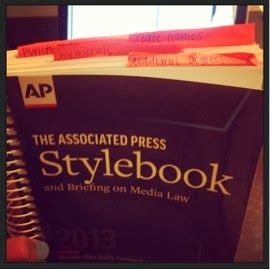
Navigating through the AP Stylebook

Sarah Lichterman

The Associated Press Stylebook is the bible of rules for writing news. My sophomore year of college, I took an entire classes dedicated to learning the ins and outs of this book. Back then, I had no idea how useful this training would be. Even though I have memorized many of the rules in the book, I still refer to it pretty much every time I write a news release to double-check a rule. Sometimes, I kick myself for having to look up a rule I should know one more time. But, I have come to realize that it is better to be safe than sorry. 

I have decided that instead of continually reading the AP Stylebook (a task similar to memorizing a dictionary), my familiarity with knowing what word or phrase has a rule and knowing how to quickly find a rule is sufficient. 

Knowing that a word or phrase has a rule is helpful, even though I may not know what the rule is. I find that this is my area of expertise. Because of my college days of memorizing rules, I am at least aware of what needs to be looked up, even if I do not know what the rule is off the top of my head. Because of this, I am regularly referring to my copy of the AP Stylebook. Nevertheless, navigating through the book can have its difficulties.

I am a book person. Even though the Stylebook is available online with a registered login, I prefer to use my hard copy. However, this can sometimes be difficult because the book is set up to not repeat rules often, even if it seems applicable. For example, if you are looking for the rule to see if a city can stand alone in a dateline, the first place you would naturally tend to look is under “C” for “cities.” However, you will only find the rule for “city” which is to “capitalize city if part of a proper name, an integral part of an official name, or a regularly used nickname: Kansas City, New York City, Windy City, City of Light, Fun City. Lowercase elsewhere…” This will not help answer your question. The correct answer can be found under “datelines.”

Here are a few examples of other rules that are frequently used and are not as easy to find as they should be.

  • Academic degrees. The rule for properly mentioning a degree to establish someone’s credentials or use in a biography. My first instinct is to always look under “D” for “degrees” instead of under “A.” The rule for “academic degree” gives a thorough explanation for all types of degrees and how you reference them. You can also look up specific degrees for a brief explanation of how to write them under the entry for “Bachelor of Arts, Bachelor or Science” and “Master of Arts, Master of Science, Master of Business Administration.” 
  • Dates. The rule for correctly writing a date. You would think that looking for “date” would give you the answer. However, this entry only gives you the rule to use Arabic figures, and does not mention how you should write the months of year. The complete rule for dates is located with the rule for “months” and referenced under “years.”
  • Numbers. The rule for how to reference numbers. However, there is no “numbers” entry in the book. There is a “numerals” entry that gives a brief explanation for how to use numbers for pretty much any situation including addresses, ages, vehicle names, dimensions, ratios, chapters, recipes, temperatures and more. Each of these topics has an in-depth explanation in their own entry.  

The Stylebook also has different sections with rules for specific topics. These sections are designed to make it easier to search for rules pertaining to these topics (as long as you know the section exists).

  • Punctuation. This section is dedicated to how to use punctuation marks. It lists all the rules for punctuation by symbol, rather than how the symbol is used. For instance, if you are looking for the rule for using a possessive noun or pronoun, you would look under “apostrophe” instead of under “possessive noun.”
  • Sports. This section explains rules for words and phrases pertaining to variety of sports such as scores, titles and names. It also contains definitions for commonly used sports jargon, as well as conferences, divisions and tournament information.
  • Food. This section shows common culinary conversions and writing guidelines for recipes. It also contains a complete list of food items and cooking techniques that explains the definition of the word and how to capitalize these items.
  • Fashion. This section contains the definition and writing rule for fashion and fabric terms, such as “A-line,” “epaulet,” “haute couture” and “pleat.” It also lists famous and commonly known fashion designers and gives a brief background on the designers.

These are just a few of the many tips and tricks to navigate through the AP Stylebook in order for you to efficiently and quickly finish your writing piece. I also suggest using Post-it notes to mark your frequently used rules. One day, I hope to know all the AP rules off hand, but I know that will come with time. For now, I will stick with my knowledge of what words need a rule and how to find them. If you know any other tips, please feel free to share in the comment section!


Friday, January 31, 2014

How to Win Angry Birds

Sarah Lichterman

Yes, I am referring to the adolescent video game, Angry Birds, which is a popular item in the iTunes app store. The skills needed to defeat the game are similar to the skills you need to avoid becoming an “angry bird” when dealing with frustrating situations. For those unfamiliar with the video game, click here to watch this how-to video that explains the game.

In the world of public relations, a normal day when everything you had planned goes accordingly is rare. Due to this, PR professionals need to be ready to deal with frustrating situations. According to an article on NBC news, a PR executive is the fifth most stressful job following enlisted military personnel, military general, firefighter and commercial airline pilot. One of the reasons this career can be stressful is because you have to flexible when problems or urgent matters occur. 

Flexibility is a trait that is rarely natural, but easy to learn. It starts with awareness. If you decide to go into the field of PR, you need to be aware that you have to be flexible. Let me repeat that for emphasis: you have to be flexible. You have to assume that most plans will not go accordingly, and you have to have a back-up plan. 

In the game of Angry Birds, you have to strategize on what type of bird will be used, in what order and where you are going to fling the birds in order to win the level. There are two main goals per level that you can craft your strategy toward: completing the level with the goal of moving to the next level or beating the level by obtaining the most possible points. 

Imagine you have been playing and replaying a level for 30 minutes, and you finally have done well enough to be able to complete it by strategically using the one bird you have left to destroy the somewhat difficult target that remains. You’ve carefully chosen which bird would be used, and your finger is on the screen carefully placing the bird in the perfect angle to hit the target. And then, your dog runs into the room, jumps on your lap and interrupts your game. You lift your finger off the screen, letting the bird fly aimlessly into oblivion and failing the level. This would be frustrating, right? 

In this type of situation, you need to remain calm and focused on your goal. If you get upset or give up, you have not only failed the level, but you have turned into an “angry bird” and failed yourself.

When a frustrating event of this kind happens in the PR profession, you need to be extremely cautious of your next steps in order to avoid being an “angry bird.” When you get an email from a client about a pitch you have been working on with a reporter for a week, and they decide they don’t want to discuss that issue, your first reaction may be to reply in frustration, using words you would probably be apologizing for later.  Let’s be honest, we all have typed out that extremely rude email reply that we had no intention of ever sending. 

However, your reaction to a frustrating situation with a client, co-worker or reporter really can make or break you. There are many different ways to relieve this stress quickly so you can get back to your job and be productive. Also, there are many ways you can manage your outlook on your workload and be proactive in avoiding stress. Below are some helpful tips to be aware of and utilize to help relieve stress at work. Click here to to read the complete article on Forbes.com.

  1. Act Rather Than React
  2. Take a Deep Breath
  3. Eliminate Interruptions
  4. Schedule Your Day For Energy And Focus
  5. Eat Right and Sleep Well
  6. Change Your Story
  7. Cool Down Quickly
  8. Identify Self-Imposed Stress
  9. Prioritize Your Priorities
  10. Reset The Panic Button
  11. Influence Others
  12. Be Your Own Best Critic

So, the answer to the question, “How do you win in Angry Birds?” is simple. Learn to be flexible when a situation arises, be cautious of your reaction and accept that you have chosen to endeavor on a task that requires patience. Whether you are flinging birds or trying to get the word out there about your client, these pointers can help you to succeed in stressful situations. On the upside, even though a career in PR can be stressful at times, it is very rewarding because it gives you the unique opportunity to be creative, learn a lot and make change happen! 

Tuesday, October 29, 2013

Use it and lose it!


Sarah Lichterman
There are more than a quarter of a million words in the English language, according to Oxford Dictionaries. Our main vernacular is made up of words and phrases that lexicographers decide should be included in the dictionary. These words can be a blessing or a curse. They can help you tell a story, explain a situation or entertain others. However, overusing words can be detrimental in some instances. 

Selective word usage is particularly important in the field of public relations. A task that a PR professional does on a regular basis is communicating with reporters. Most of the time, these conversations are initiated through printed (or typed) communication, such as an email or a news release.  In this technologically savvy age, reporters receive hundreds of emails a day – many of them from PR people. Due to this, reporters do not have the time to read through mindless words that serve no purpose but to fill space. Many of these words are useless because they are meaningless, obvious or redundant.

Here are a few of these words that you should avoid using, according to Shanna Mallon with Ragan Communications. 

Just. Personally, I am guilty of often using the word “just” in my professional and personal life. But when I think about it, it really is a meaningless filler word. For example, when typing that sentence, I naturally typed, “It really just is a meaningless filler word.” Including it would have brought nothing to the sentence, except to make the sentence four characters longer. The definition of “just” is “based on or behaving according to what is morally right and fair” when used as an adjective. It can also be used as an adverb to mean “exactly” or “very recently; in the immediate past.” Neither of these definitions would have justified the way that I was trying to use the word in that sentence. 

Really/very. These words are examples of writing the way you talk. They do not translate well into digital communication. The emphasis given when verbally using these words is lost when converted into text.

Perhaps/maybe. These words portray uncertainty in your writing. A journalist’s job is to get the facts out quickly. When you use vernacular that imposes that your content is questionable, your message is more likely to be ignored.

Things/stuff. These words are useless in communicating a message. Additional statements with more specific content are needed in order to communicate a complete idea in text. For example, think about this sentence: “I used the things on the counter to clean up that stuff on the floor.” I understand the concept of the sentence, but still need more information to fully understand what is being communicated. Using more specific words can simplify the sentence structure, such as “I used the paper towels to clean up the spilled milk.” 

Besides these filler words, there are many words that are overused in communication efforts by public relations professionals. This past year, Shift Communications conducted research to find the most overused words in news releases in 2012. Among the top used were global, forwards, solution, international and leading. Check out this infographic to view the rest of their findings.

So next time you are typing an email or writing a news release, be cautious of the words you are using. It would be a shame to lose a great story because you lost a reporter’s attention by using unnecessary words. As the saying goes, quality is what matters, not quantity. 

Friday, October 4, 2013

What is this workout you speak of?

Sarah Lichterman
Between an 8-to-5 job and technology that makes bringing work home possible, it’s getting harder and harder for people to find time to work out during the workday. It seems the terms “work out” and “exercise” are becoming obsolete vernacular in some offices. This can be detrimental to some because exercise is crucial to maintaining a healthy weight, as well as managing stress. According to the Mayo Clinic, almost any form of exercise can act as a stress reliever, which is absolutely needed in today’s fast-paced society.

www.flickr.com/photos/ggvic/624086826
Some companies are committed to providing their employees with resources in the office because of this. For example, at many of Google’s offices, there are on-site fitness centers, as well as more than 230 exercise classes offered each week. PepsiCo provides an ongoing wellness program for employees and their families that includes routine medical care programs at work sites, education programs on health and fitness and on-site fitness centers and exercise programs. And, for those who work at Apple headquarters, there is a full-services fitness center, basketball gym and recreation room.

Although everyone isn’t lucky enough to enjoy these daily perks offered at Fortune 500 companies, there are ways to incorporate a healthy amount of fitness in the average workday. There are few small businesses out there that have exercise incentives, even if it’s not quite a state-of-the-art fitness gym. If yours is not one of these, it may be time to bring up this issue to the boss. Research shows that devoting time for physical activity can lead to higher productivity, according to Science Daily.

At Obsidian, we are allowed two and a half hours a week for exercising, which evens out to 30 minutes a day. This may not seem like much, but combined with an hour for lunch or leaving the office 30 minutes early to catch the 5:30 p.m. class at the gym, it can make all the difference.  

Still, if you’re company hasn’t jumped on the bandwagon of providing resources for employee fitness, here’s a few in-office exercises that can help increase your level of physical activity and decrease your level of stress.
  • The Pre-Sit Stretch: Before heading into a long meeting or finishing a big project at your desk, take a few minutes to stretch. First, loosen up your neck and shoulders by rolling your shoulders forward and backward in a circular motion. Do this 20 times in each direction. Next, stand with your back against a wall and try to touch your toes without bending your knees to stretch your hamstrings. Do this for 45 seconds. Lastly, face a wall and lean your toe up against it to stretch your calves. (Ladies, I recommend taking off heels before this.) Then place your palms on the wall and lean into it. Do this for 30 seconds on each calf, and then repeat. 
  • The Glute Workout While You Wait: Here’s something you can do while waiting on a copy, fax, scan or print job. Stand at the machine and place your hands on the top of it. Then bend your knee and raise one of your heels up to your buttocks. Do this 15 times on each side, and then repeat. Also, you can turn this into a calf raise by lifting one leg up and with the other leg, raise your heel up and down. 
  • The Lower Body Pep-up: This is simply lunges and squats. If you want to be secretive, you can do stationary lungs and squats in the comfort of your own office or cubicle. But if it’s appropriate, you could do walking lungs down the hallway of your office. Maybe you’ll even motivate a co-worker to join in? Do 25 lungs on each side and 25 squats.
  • The Anti-Push-Up Chair Dip: If you’re looking for an arm workout, here’s an alternative to having to do a push-up on the office floor. Pull your chair out slightly from your desk and sit at the edge of it (use a chair preferable one without wheels) and place your hands on the edge of your seat with fingers pointing out. Slowly lift off your seat and lower your body to the floor by bending your elbows then push yourself back up. Do 15, and then repeat.
And ta-da, you have now increased your productivity. Feel free to comment to let me know what you think about this workout or let me know your own personal in-office work out!

Friday, August 30, 2013

My Top 5 Reads for PR professionals

Sarah Lichterman
Being in the high-speed world of public relations, the luxury of having time to search for the perfect book is rare. I am here to help! I ventured through the shelves at the Booksellers at Laurelwood and did some additional research by reading online reviews to discover my list of top five reads for a PR professional. Here are my findings (in no particular order):


www.flickr.com/photos/azrasta/5088254388/
  • Crush it! by Gary Vaynerchuk
    This is the one book on this list that I have actually read and highly recommend. Vaynerchuk explores all areas of social media by using examples from his own life and research to prove that anyone can live their passion and make things. He outlines his steps to success in order to build a name for a business or personal brand. This book will help you find your passion and be empowered to accomplish your dreams.
  • The New Rules of Marketing & PR: how to use new releases, blogs, podcasting, viral marketing & online media to reach buyers directly by David Meerman Scott
    This book is good for those who are just starting out, as well as for seasoned pros in both marketing and public relations. It gives a fresh perspective regarding new ways to use social media, blogging and online marketing to remain competitive with the constantly changing trends of online PR.
  • How to Win Friends and Influence People by Dale Carnegie
    Published in 1937, this classic has sold more than 15 million copies and has been referred to as the public relations bible. In this book, Carnegie explains many techniques that bring professional knowledge and personal touch together. It focuses on building relationships and how to build leadership skills.
  • The Tipping Point: How Little Things Can Make a Big Difference by Malcolm Gladwell

    “The tipping point is that magic moment when an idea, trend, or social behavior crosses a threshold, tips, and spreads like wildfire.” This book analyzes patterns in human behaviors. It is thought-provoking and explores different trends of word-of-mouth marketing.
And last but not least… 
  • Associated Press Stylebook by the Associated Press
    Published and updated annually, the AP Stylebook is the No. 1 must-have for any public relations professional or student. This book contains important guidelines for journalistic writing. If you don’t have a personal copy already, go get it now! I recommend getting the spiral-bound version for easier use.
If you have read any of these books or have any suggestions for a good PR read, please comment and let us know! Happy reading!